Open-source kit for Orca ADE

Describe the task in one sentence. A team of AI agents does the rest.

Orca Flow Kit turns the AI coding agents you already use — Claude, Codex, Gemini and more — into a team that works like an assembly line: one plans, one designs, one codes, others review and test. You watch every step live, and every result is saved as a readable file.

$npx github:vankhangfet/orca-sdlc-kit
.orca/artifacts/status.html — live
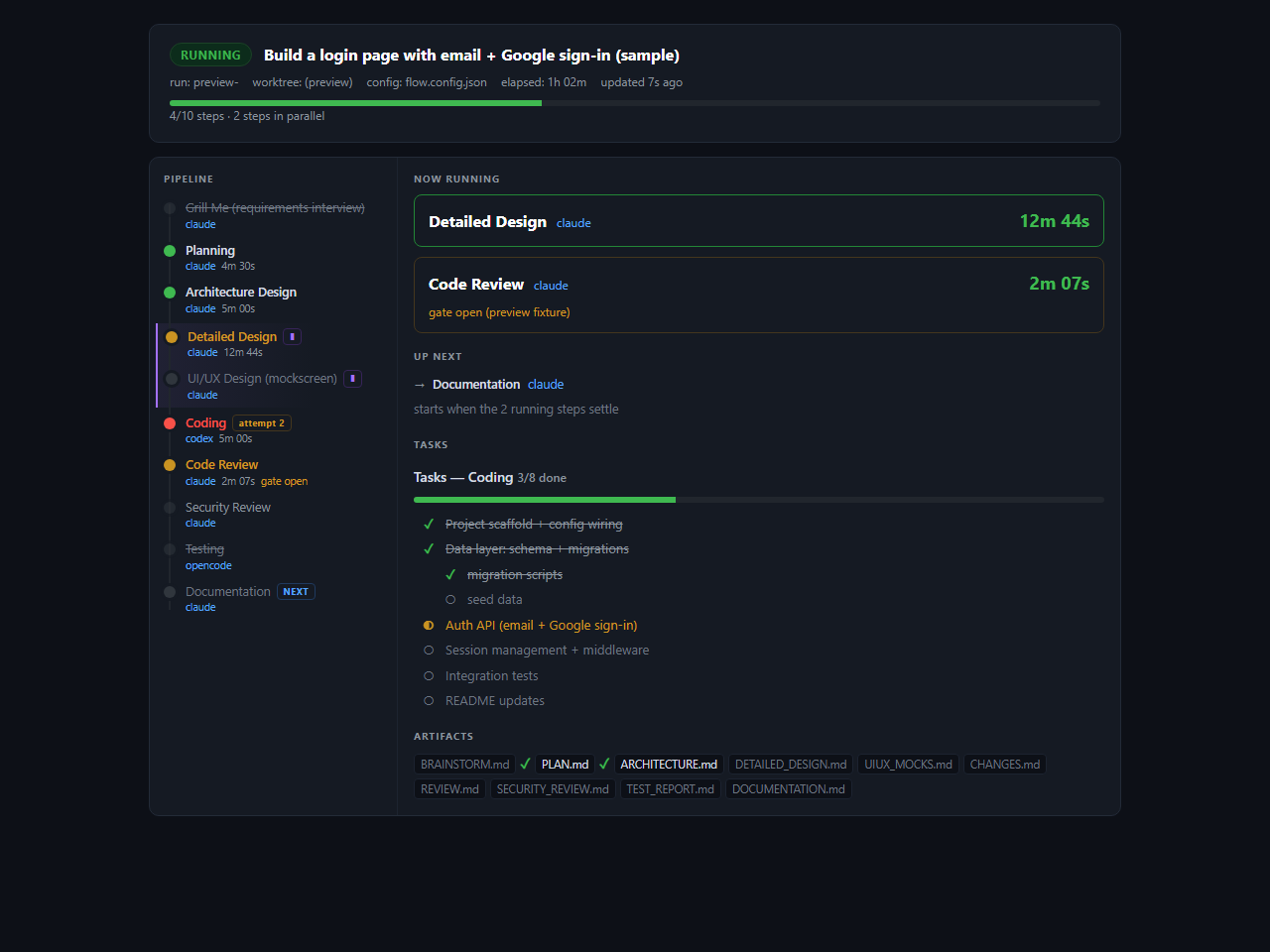
Live status page: pipeline steps on the left with their agents and timings, the running steps and a coding task checklist on the right.

The live status page — opens by itself when a run starts.

YOU

Write one sentence

For example: "Build a login page with email + Google sign-in."

THE AGENTS

Plan, build, review, test

Each agent does one job, then hands its result to the next. Failed checks go back for a fix.

YOU GET

Working code + a paper trail

Code, plus PLAN.md, reviews, test report and docs — all on disk to read or edit.

Watch first

See the whole idea in under two minutes.

The problem, how the pipeline works, the live demo and how to install. Jump to any part with the chapter buttons.

Why use it

Driving AI agents by hand doesn't scale to real work.

One chat with one agent is fine for small things. For a real feature you end up copying prompts around and hoping nothing gets skipped. The kit makes the process repeatable.

Without the kit

  • ✕You copy prompts and answers between terminals yourself.
  • ✕A fresh chat forgets the decisions made in the last one.
  • ✕Nothing forces a code review, a security check or a test to happen.
  • ✕Hard to see where the work is, or what it cost.

With the kit

  • ✓One command starts the whole pipeline — agents hand off to each other.
  • ✓Every decision is written to a Markdown file the next agent reads.
  • ✓Review, security and tests are built-in steps; failures loop back to the coder.
  • ✓A live status page shows progress, timings, retries and token usage.
How it works

An assembly line of specialist agents.

Here is the default workflow (full software delivery). Each box is one agent with one job. It writes its result to a file, and the next agent reads that file. Blue boxes run at the same time.

01
Planning
Scope, requirements, acceptance criteria
claude
→ PLAN.md
02
Architecture
Overall structure and tech choices
claude
→ ARCHITECTURE.md
03 ∥
Design + UI/UX
Detailed design and screen mockups, in parallel
claude
→ DETAILED_DESIGN.md
→ UIUX_MOCKS.md
04
Coding
Writes the code, task by task
codex
→ CHANGES.md
05 ∥
Review + Security
Code review and security review, in parallel
claude
→ REVIEW.md
→ SECURITY_REVIEW.md
06 → 07
Testing → Docs
Runs the tests, then writes the documentation
opencode · claude
→ TEST_REPORT.md
→ DOCUMENTATION.md
Runs in parallel Quality check — can send work back claude = the CLI agent used (changeable)
Automatic fix loop: if code review, security review or testing fails, the work goes back to the Coding step with the feedback — up to a set number of retries — so a failed check can't slip through.

Everything is left on disk

All results land in .orca/artifacts/ as Markdown. Read, edit or reuse any step's output. Each new run keeps a snapshot of the last one.

Every run is accounted for

Tokens per step (in / out / cache) go to USAGE.md and onto the status page.

Use the agents you already have

Mix CLI agents freely — one per step, changed with one line of JSON.

Results can reach your team

Optional: each step's verdict is posted to Slack, Telegram, MS Teams or WhatsApp while the run is going.

Supported CLI agents

claudecodexopencodegeminicursorgrokkiro-cli+ any CLI agent Orca supports
What you'll see

Not a black box.

Two screens you'll use: a status page to watch a run, and a visual designer to build workflows without touching JSON.

Watch every run live

When a run starts, status.html opens in your browser and updates itself.

  • Which step is running now, and what's next
  • Time per step and retry attempts
  • The coder's task checklist (queued ○ · doing ◐ · done ✓)
  • Links to every artifact file as it's written
try it without running anything
$ node .orca/flow.mjs --status-preview
status.html
Status page with pipeline, running steps, task checklist and artifact list.

Build workflows by clicking

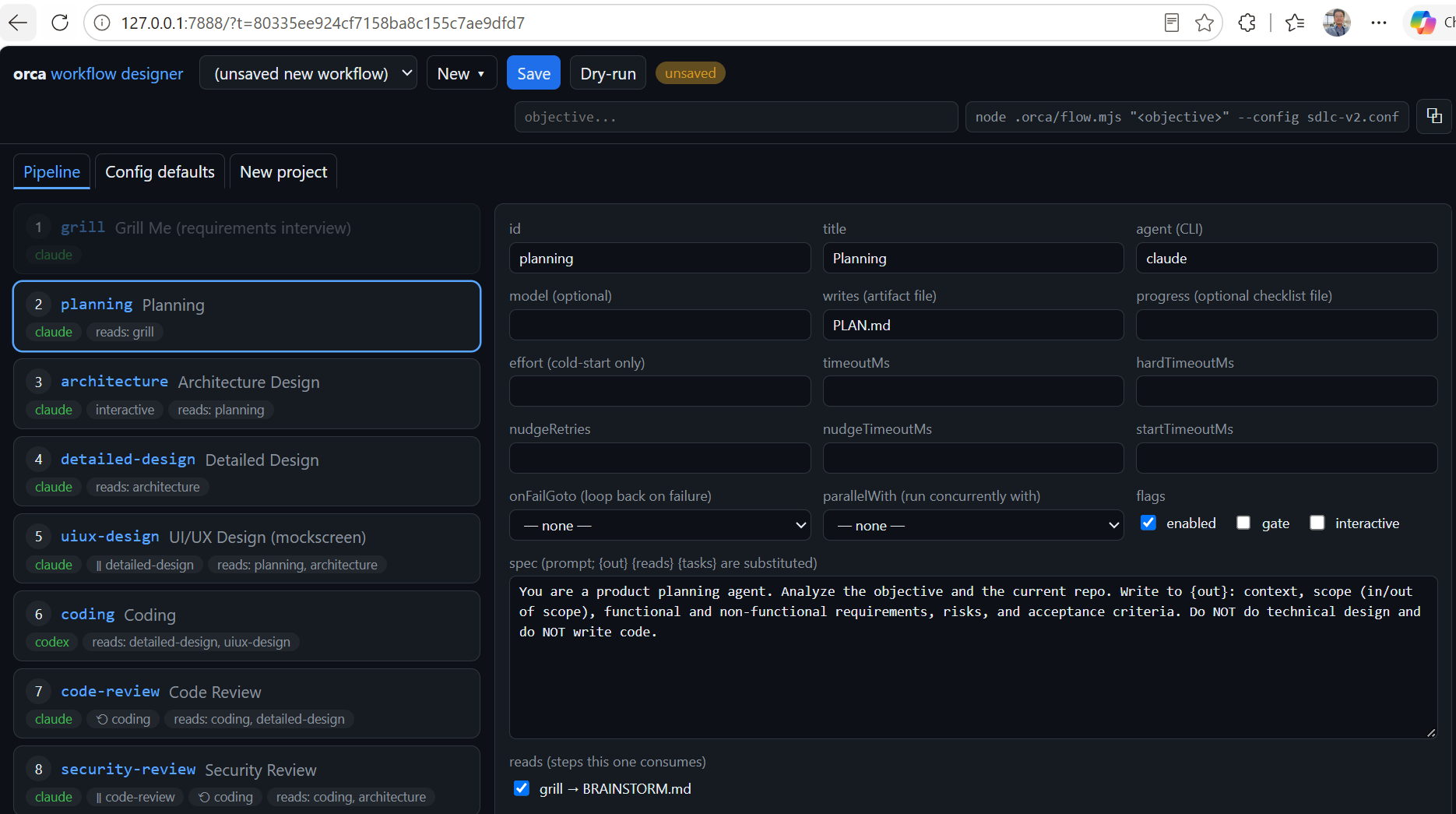
Prefer forms over JSON? The Workflow Designer is a small local web app that creates and edits every config.

  • Step cards in run order — drag to reorder
  • A full form per step: agent, model, prompt, retries, parallel…
  • Dry-run button shows the plan or the exact error
  • Runs only on your machine (localhost + one-time token)
terminal
$ node .orca/designer.mjs   # opens in your browser
127.0.0.1 — orca workflow designer
Workflow Designer: list of pipeline steps on the left, form for the selected Planning step on the right.
Case studies

Four situations, step by step.

Pick the situation closest to yours. Each story shows what you type, what every agent does, where a check fails and loops back, and what you have at the end.

New feature · flow.config.json (default)

A web team adds email + Google login in one run

The situation: Mai's team needs a login page. Before, she prompted one agent, pasted the answer into another chat for review, and had to remember to ask for tests. Security was checked "if there was time".

1 · What she types
terminal
$ node .orca/flow.mjs "Build a login page with email + Google sign-in"
2 · What the agents do
  1. Planningclaudedone

    Turns the sentence into scope and acceptance criteria.

    PLAN.md- AC1: sign in with email + password
    - AC2: sign in with Google
    - Out of scope: password reset
  2. Architectureclaudedone

    Chooses the approach and where the code goes.

    ARCHITECTURE.mdGoogle OAuth 2.0 + server session
    New module: src/auth/
  3. Detailed design ∥ UI/UXclaude × 2done · parallel

    Two agents at the same time: one designs the API and data, one mocks the screen.

  4. Codingcodexdone

    Splits the work into a task checklist you can watch tick off on the status page, then writes the code.

  5. Code review ∥ Security reviewclaude × 2security: fail

    Code review passes. Security review finds a real problem.

    SECURITY_REVIEW.mdFAIL — session token is stored in localStorage.
    Fix: use an httpOnly, Secure cookie.
  6. Back to Coding (attempt 2)codexautomatic

    No one has to notice. The coder gets the review as input and fixes it. Both reviews run again and pass.

  7. Testing → Docsopencode · claudedone

    Tests are written and run, then the docs are updated.

    TEST_REPORT.mdAll tests passed · AC1 ✓ · AC2 ✓
3 · What she gets
  • Working login code in her worktree, ready for a pull request
  • Plan, design, review, test report and docs in .orca/artifacts/
  • Token cost per step in USAGE.md
Why it helpsThe security bug was caught and fixed before review by a human — because the security step is part of the pipeline, not something to remember.
Bug fix · fixbug.config.json

Support reports: "the cart total is wrong"

The situation: A customer says the total doesn't change after removing an item. The developer on duty has the report but not the cause — and a quick patch without a test tends to come back.

1 · What he types — what happens, what should happen, how to reproduce
terminal
$ node .orca/flow.mjs --config fixbug.config.json "Cart total does not change after
  removing an item. Expected: total drops by the item price.
  Repro: add 2 items, remove 1."
2 · What the agents do
  1. Root-cause analysisclaudedone

    Reads the code and reproduces the problem before anyone changes anything.

    root-cause notesThe total is calculated once when the cart loads.
    removeItem() updates the list but never recalculates it.
  2. Fix planclaudedone

    The smallest safe change, and the test that proves it.

    fix plan1. Recalculate the total inside removeItem()
    2. Regression test: "removing an item lowers the total"
  3. Fix + regression testcodexdone

    Applies the fix and adds the test, so this exact bug can't quietly return.

  4. Verificationcheckpass

    Re-runs the reproduction steps and the test suite. If it failed, the work would go back to the fix step automatically (up to 2 retries).

3 · What he gets
  • The fix plus a regression test
  • A root-cause write-up to paste into the ticket
Why it helpsThe workflow forces "understand first, then fix, then prove it" — the order good engineers follow, even at 6 pm on a Friday.
Change request · cr.config.json

Add a "Download CSV" button to the Orders report

The situation: A product manager asks for CSV export on an older system. The change is small; the risk is breaking something nearby that nobody remembers depends on it.

1 · What she types — what changes and why
terminal
$ node .orca/flow.mjs --config cr.config.json "Add a Download CSV button to the
  Orders report so finance can open it in Excel. Dates in UTC."
2 · What the agents do
  1. Impact analysisclaudedone

    Finds everything the change touches — before any code is written.

    impact notesTouches: orders report page, orders API
    Risk: date formatter is shared with the Invoices module
  2. CR plan → Coding → Reviewclaude · codex · claudedone

    Plans the change to avoid the shared formatter, writes it, reviews it.

  3. Testingopencodefail

    A test compares the export with the request and catches a mismatch.

    test reportFAIL — dates exported in local time; the request says UTC.
  4. Back to Codingcodexautomatic

    The coder fixes the date format. Review and testing run again and pass.

  5. Acceptancecheckpass

    A final check against the original request: button present, file opens in Excel, dates in UTC.

3 · What she gets
  • The change, reviewed and tested
  • An impact report to attach to the change request
Why it helpsImpact analysis protects the Invoices module, and the acceptance check keeps the result tied to what was actually asked for.
Beyond code · your own workflow

A tech lead needs a decision-ready migration plan

The situation: Management wants a proposal for moving from REST to GraphQL. No code — just a plan with options, trade-offs and risks that survives tough questions.

1 · He makes a 3-step workflow (in JSON or the Workflow Designer)
.orca/plan.config.json — pipeline (simplified)
[
  { "id": "research", "agent": "gemini", "writes": "RESEARCH.md" },
  { "id": "draft",    "agent": "claude", "writes": "PLAN.md", "reads": ["research"] },
  { "id": "review",   "agent": "codex",  "reads": ["draft"],
    "onFailGoto": "draft" }   // weak plan → redraft
]
terminal
$ node .orca/flow.mjs --config plan.config.json "Plan our migration from REST to GraphQL"
2 · What the agents do
  1. Researchgeminidone

    Collects how the current APIs are used and common migration approaches.

  2. Draftclaudedone

    Writes three options with trade-offs and a recommendation.

    PLAN.mdA. Big-bang rewrite   B. GraphQL gateway over REST
    C. New endpoints only → Recommended: B
  3. Reviewcodexfail

    A different agent (a different model, a fresh view) challenges the draft.

    reviewFAIL — no rollback plan; no cost estimate for option B.
  4. Back to Draft → Reviewclaude · codexpass

    The plan is redrafted with rollback steps and costs, then passes review.

3 · What he gets
  • A reviewed PLAN.md with options, risks, rollback and costs
  • The research notes behind it
Why it helpsUsing a different agent as reviewer catches gaps the author missed. The same pattern works for launch posts, reports or training material.

These are illustrative walk-throughs: names and agent outputs are shortened examples, not recorded runs. Step names follow the workflows that ship with the kit.

Get started

Your first run in four steps.

The kit has no runtime of its own — it drives agents inside Orca ADE terminals. Before you begin, make sure you have:

Orca ADE installed and signed in Node.js The agent CLIs you'll use (e.g. claude, codex, opencode) Windows, macOS or Linux
1

Add the kit to your project

Run this in your project's root folder. It copies orca.yaml and the .orca/ folder (engine, three workflow configs, docs). Running it again only adds missing files — your edits are safe.

terminal — project root
$ npx github:vankhangfet/orca-sdlc-kit

Tip: add .orca/artifacts/ to your .gitignore — that's where run results go.

2

Turn on orchestration in Orca

In Orca ADE open Settings → Experimental and enable Orchestration. Then create a worktree for your project — the kit's hook prepares .orca/artifacts/ for you.

3

Preview the plan (dry run)

A dry run shows which steps will run, with which agent — and calls no agents. Always start here.

terminal — inside the worktree
$ node .orca/flow.mjs --dry-run "Build a login page"
4

Run it and watch

Drop --dry-run to start for real. The status page opens by itself. Long quiet periods are normal — agents are working.

terminal — inside the worktree
$ node .orca/flow.mjs "Build a login page"

Handy commands

One-off options for a single run — your config file stays untouched.

I want to…Command
Continue from a step (after a stop or failure)--from coding "…"
Run only some steps--only planning,architecture "…"
Use a different agent for one step--agent coding=claude "…"
Be interviewed about requirements first--grill-me "…"
Use another workflow (e.g. bug fix)--config fixbug.config.json "…"
Don't open the status page--no-open-status
Ready-made workflows

Three workflows ship ready to run.

Pick the one that matches your job. Each is just a different JSON config — the engine is the same.

Full SDLC — the default. Use it to build something new, end to end.

Planningclaude
→
Architectureclaude
→
Design ∥ UI/UXclaude
→
Codingcodex
→
Review ∥ Securityclaude
→
Testingopencode
→
Docsclaude
run
$ node .orca/flow.mjs "Build a login page"

Bug fix. Finds the root cause first, then fixes it with a regression test. Describe what happens, what should happen, and how to reproduce.

Root causeanalysis
→
Fix planclaude
→
Fix + testregression test
→
Verificationcheck
run
$ node .orca/flow.mjs --config fixbug.config.json "What happens, what should happen, how to reproduce"

Change request. For maintenance on an existing system: checks the impact first, then changes, reviews, tests and accepts.

Impactanalysis
→
CR planclaude
→
Codingcodex
→
Reviewclaude
→
Testingopencode
→
Acceptancecheck
run
$ node .orca/flow.mjs --config cr.config.json "What changes and why"

Orange-bordered steps are quality checks: a failure sends the work back to the coder. Want the code pushed at the end? Variants with a final Rebase & Push step live in .orca/workflow-template/.

Make it yours

Change anything in one JSON file.

The whole workflow lives in .orca/flow.config.json. No code edits — ever. (Or use the Workflow Designer above.)

I want to…Do this
Skip a stepset "enabled": false
Use another agentset "agent": "gemini"
Change what a step doesedit its "spec" (the prompt)
Add my own stepadd an entry to "pipeline" — order = run order
Run two steps at onceset "parallelWith": "<step-id>"
Retry more on failureraise "maxRetries"
Allow more timeraise "timeoutMs" / "hardTimeoutMs"
.orca/flow.config.json — one step
{
  "id": "coding",
  "title": "Coding",
  "agent": "codex",        // which CLI agent
  "model": "default",      // which model
  "writes": "CHANGES.md",  // its output file
  "reads": ["architecture"] // inputs from earlier steps
}

autoRun (on by default): agents decide on their own and write down their assumptions. Turn it off to let agents ask you questions and to pause at approval checks.

How it compares

A different layer, not a competitor.

LangGraph, CrewAI and the OpenAI Agents SDK help you build agents in code. n8n connects tools. This kit sits above ready-made coding agents and runs them as a disciplined pipeline.

Orca Flow KitLangGraphCrewAIOpenAI Agents SDKn8n
Main ideaWorkflow layer for coding agentsGraph engine for agent logicTeams of agentsAgent runtime + SDKVisual automation
Defined inJSON — no codePythonPython / YAMLPythonVisual UI
AgentsCLI agents you already haveYou build themYou build themYou build themTool nodes
Key strengthLive status page, results on diskFull graph controlRole-based collaborationSDK integrationsTools, hooks, data apps
FAQ

Common questions

Short answers for first-time users.

What is Orca ADE, and do I need it?

Yes. Orca ADE is the agent development environment that provides the terminals and worktrees the agents run in. This kit is the workflow layer on top — it has no runtime of its own.

What is an "artifact"?

A plain Markdown file a step writes as its result — for example PLAN.md or TEST_REPORT.md. They all go to .orca/artifacts/. The next step reads them, and so can you.

Do I have to write code to change the workflow?

No. Everything is in one JSON file, or you can click through the Workflow Designer (node .orca/designer.mjs).

Is it only for software development?

No. SDLC is just the example that ships in the box. Research plans, documents, content — any job that fits "several agents, each doing one step" works.

A step has been quiet for a long time. Is it stuck?

Usually not — the flow waits until the agent finishes or hits its hard timeout. If a step really runs too long, the status page shows STILL RUNNING and prints the exact --from command to continue later. If Orca's state looks stale, run orca orchestration reset --all --json.

Can I stop and continue later?

Yes. Use --from <step-id> — earlier results on disk are reused, so finished steps don't run again.

How do I know what a run cost?

Token usage per step (in / out / cache) is written to USAGE.md and shown on the status page.

Is it free?

The kit is open source under the MIT license and has zero npm dependencies. You still need access to the AI agents/models you choose to run.